

The Item Wise Profit Report compares what each item sold for with
what it cost, and shows Total Sales, Total Cost and Net Profit per item,
excluding VAT. Use it monthly to find low-margin lines and to check
salesman performance. Available in ERP, Restaurant, Retail, Retail 2nd
Edition and Weigh Scale editions.
Before you start
- Your user needs Reports permission and Show Cost
Price ticked in Admin → User Management. - Purchase prices must be entered, either on GRNs (with Cost
Control or Average Cost Control on in
Admin → Settings) or as Purchase Price / Unit in Item
Master.
Steps
- Open Reports → Item Wise Profit Report. The
Itemwise Profit Report screen opens.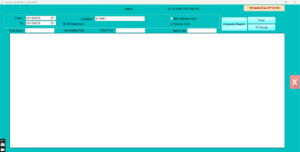
- Set From and To dates.
- Choose the cost basis:
- Invoice Cost uses the cost recorded on each invoice
line at the time of sale (from GRN or average cost). - Item Master Cost uses today’s Purchase Price / Unit
from Item Master for every sale.
- Invoice Cost uses the cost recorded on each invoice
- Keep All Item and All Salesman, or
filter to one item or one salesman. - Select the Location or keep all.
- Click Generate Report. Each row shows the item with
Total Sales, Total Cost and Net Profit (Excluding Tax). Totals appear at
the bottom.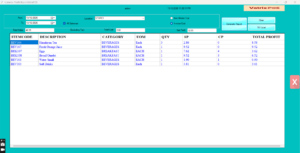
- Click TO Excel or Print as needed,
then Clear to run again.
Check it worked
Pick one item: Total Sales here should equal its net value in
Reports → Item Wise Sales Report for the same
period.
Common problems
- Profit equals sales (cost zero) → items were sold before any GRN or
purchase price existed. Enter Purchase Price / Unit and use Item Master
Cost, or switch on Cost Control going forward. - Negative profit on some items → selling price below cost, or cost
entered per case while selling per piece. Check UOM and Multi UOM
links. - Report blocked → Show Cost Price is off for your user.
Video
FAQ
Which cost basis should I use? Invoice Cost for true
historical margin; Item Master Cost for a quick view when GRNs were not
used.
Does it include sales returns? Returned items reduce
the item’s sales and cost.
Is discount considered? Yes. Total Sales is the net
line value after discount, before VAT.
Need help?
WhatsApp +971 50 428 2953 · sales@vatrixerp.com · 9:30 am–9:30
pm.