

The Supplier Ledger shows one supplier’s account line by line: goods
received (credit), purchase returns and payments (debit), with the
opening balance, running balance and closing balance for the period. Use
it before paying a supplier, to match their statement, or to settle a
dispute. Available in ERP, Laundry, Restaurant, Retail, Retail 2nd
Edition and Weigh Scale editions.
Before you start
- Your user needs the Finance Reports permission.
- GRNs must be approved and payment vouchers posted; unposted
documents are not in the ledger.
Steps
- Open Reports → Supplier Ledger. The SUPPLIER LEDGER
screen opens.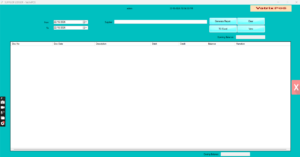
- Type the Sup Code, or pick the supplier from the
Supplier list. - Set From and To dates. The opening
balance is calculated from all entries before the From date. - Click Generate Report. The grid shows
Opening Balance, then each entry with Doc Date, Doc No,
Description, Narration, Debit, Credit
and running Balance, ending with Closing
Balance.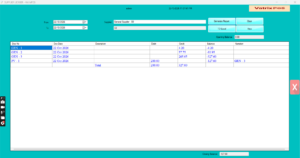
- Select a line and click View to open the original
GRN, return or voucher. - Click TO Excel to send the ledger to the supplier
or your accountant. - Click Clear to look up another supplier.
Check it worked
The Closing Balance should equal the supplier’s figure in
Reports → Supplier Ageing Report as at the To date.
Common problems
- Balance differs from the supplier’s statement → a GRN is saved but
not approved, or a payment was posted to the wrong supplier code. Check
SAVED DOC in Goods Reciept Note and Finance →
Voucher. - Opening balance shows zero for an old supplier → the opening balance
was never entered. Post it with Finance → Journal
Voucher dated before your start date. - Supplier not in the list → the code is frozen. Unfreeze it in
Supplier Master to view, then freeze again.
Video
FAQ
Which side is what I owe? Credit entries (GRNs)
increase what you owe; debit entries (payments, returns, debit notes)
reduce it. A credit closing balance is payable.
Can I see all suppliers at once? Use Reports
→ Supplier Ageing Report for balances of every supplier by
age.
Can I print it as a statement? Export to Excel and
print, or use Print where available on the report.
Need help?
WhatsApp +971 50 428 2953 · sales@vatrixerp.com · 9:30 am–9:30
pm.