

A Purchase Return sends goods back to the supplier and reverses the
stock and the supplier balance that the Goods Receipt Note (GRN)
created. Pulling the GRN into the return keeps the same items, prices
and VAT, so you only choose the quantities. Available in ERP,
Restaurant, Retail, Retail 2nd Edition and Weigh Scale editions.
Before you start
- The original GRN must be saved and approved in Procurement →
Goods Reciept Note. - Your user needs Procurement permission.
- Know the GRN number, or the supplier code and date.
Steps
- Open Procurement → Purchase Return. The PURCHASE
RETURN screen opens with a new PRTN NO. - Enter the Supplier Code (or use search). The
supplier name, TRN and address fill in. - Type the original GRN number in GRN NO and click
PULL. All lines from that GRN load into the grid.
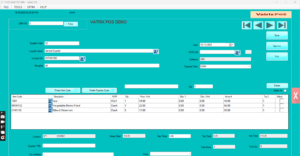
- Tick Select on the lines you are returning. Use
Select All if the whole delivery goes back. Tick
Delete for lines you want removed. - Change Qty on each selected line to the quantity
being returned. Price /Unit, Tax% and Amount are taken from the
GRN. - Type a reason in Remarks (for example “damaged on
arrival”) and the supplier credit reference in Ref No
if you have one. - Click Save. Vatrix confirms the document.
- Click Approve. Stock is reduced and the supplier
account is debited.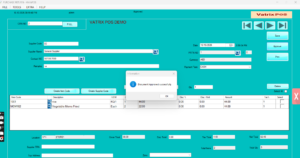
- Click Print or PRINT PREVIEW for a
copy to send with the goods.
Check it worked
Open Reports → Stock Report: the returned quantity
is gone. Open Reports → Supplier Ledger for the
supplier: the return appears as a debit reducing what you owe.
Common problems
- PULL loads nothing → the GRN is not approved, or the supplier code
differs from the GRN. Check SAVED DOC in Goods Reciept
Note. - Cannot change Qty above the received amount → returns are limited to
what was received on that GRN. - Approve is greyed → the document is not saved yet, or your role
lacks approval rights.
Video
FAQ
Can I return without a GRN? Yes. Add items manually
on the Purchase Return screen, but pulling the GRN is safer for prices
and VAT.
Does the return reduce my input VAT? Yes. The VAT on
the return is reversed and shown in the VAT Filling Report.
Can I edit an approved return? No. Make a new GRN to
bring the goods back in, or contact support.
Need help?
WhatsApp +971 50 428 2953 · sales@vatrixerp.com · 9:30 am–9:30
pm.