

The Balance Sheet shows your assets on one side and equity and
liabilities on the other, as at a chosen date, built from every approved
invoice, GRN and voucher. You need it for year-end accounts, bank or
licence renewals, and to check that stock, cash, receivables and
payables are in balance. Available in all editions with the Finance
Reports permission; the ERP edition gives the full chart of
accounts.
Before you start
- Your user needs the Finance Reports permission.
- All documents up to the report date must be approved, and vouchers
posted. Unposted entries are left out. - Opening balances for bank, capital and stock should have been
entered by journal voucher when you started Vatrix.
Steps
- Open Reports → Balance Sheet. The BALANCE SHEET
screen opens. - Set the Date. The report shows balances as at the
end of that day.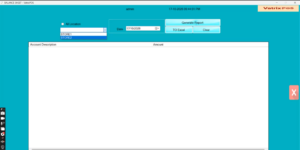
- Leave All Location ticked for the whole company, or
choose one location for a branch-only view. - Click Generate Report. The grid lists each ledger
account under its category (Asset, Equity and Liability) with Account
Description and Amount.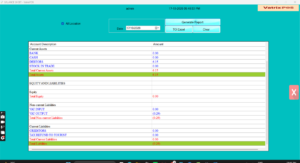
- Check that total assets equal total equity and liabilities. The
current-year result flows in from the Income Statement. - Click TO Excel to save a copy for your
accountant. - Click Clear to run another date.
Check it worked
Run Reports → Trial Balance for the same date. Its
debit and credit totals should match, and each balance-sheet account
should show the same figure.
Common problems
- Sides do not balance → an opening-balance journal was posted to one
side only. Check Finance → Voucher for the opening JV
and correct it. - Stock value looks wrong → items were sold without cost, or Cost
Control is off. Enable Cost Control or Average
Cost Control in Admin → Settings and enter
purchase prices. - Report empty → date is earlier than your first transaction, or
Finance Reports permission is off.
Video
FAQ
Is this IFRS format? Vatrix groups accounts by
Asset, Equity and Liability, Income and Expense, matching IFRS-style
statements used in the UAE.
Can I see a comparative (last year) column? Not on
this screen. Generate two dates and compare in Excel.
Where does VAT payable appear? Under liabilities, as
the output VAT less input VAT accounts; the VAT Filling Report gives the
FTA return figures.
Need help?
WhatsApp +971 50 428 2953 · sales@vatrixerp.com · 9:30 am–9:30
pm.