

Freezing an account hides it from vouchers and invoices so nobody
posts to it by mistake, while every old transaction stays in the
reports. Use it for a closed bank account, an old expense head, or a
customer or supplier you no longer deal with. Vatrix never deletes an
account that has entries, so freezing is the correct way to retire one.
Available in ERP, Restaurant, Retail, Retail 2nd Edition and Weigh Scale
editions.
Before you start
- Log in as admin or a user with Finance permission.
- Make sure the account balance is settled, or note it, because a
frozen account still shows in the Trial Balance.
Steps
Ledger (main) account
- Open Master → Account Master. The Main Account
screen opens. - Find the account: type in Account Description
search or use Search Main Code, then click the row. Its
Account Number, Category and Type fill in.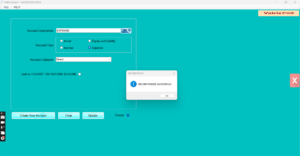
- Click Freeze. Vatrix asks you to confirm. Click
Yes. - Click Clear. The account now shows as frozen in the
list.
Customer or supplier account
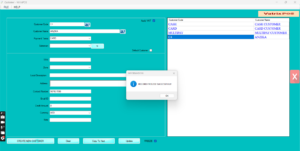
- Open Master → Customer Master (or Master →
Supplier Master). - Select the customer or supplier from the list.
- Click FREEZE and confirm.
Check it worked
Open Finance → Journal Voucher and search the
account in MAIN A/C or SUB A/C. It should no longer appear in the list.
Old entries still show in Reports → General Ledger.
Common problems
- Freeze button missing → your user role does not include Finance or
the master screens. Ask the admin to update permissions in Admin
→ User Management. - Account still appears in a voucher → the voucher screen was open
before you froze it. Close and reopen the voucher. - Need the account back → select it again in Account Master and click
Freeze a second time to unfreeze.
Video
FAQ
Can I delete an account instead? Only if it has no
transactions. Otherwise Vatrix blocks deletion to protect your
books.
Does freezing a customer cancel their outstanding
balance? No. The balance remains in the Customer Ledger and
Customer Ageing Report.
Can Vatrix freeze old codes automatically? Yes.
Admin → Maintanance has options to Freeze Aged
Customer, Supplier and Item codes.
Need help?
WhatsApp +971 50 428 2953 · sales@vatrixerp.com · 9:30 am–9:30
pm.