

A combo (bundle) item is one line on the invoice, for example “Burger
Meal” or “Shampoo + Conditioner Pack”, made from several stock items.
Vatrix POS sells it at one price and reduces the stock of each
component. Use it for meal deals, offer packs and assembled products.
Available in ERP, Restaurant, Retail, Retail 2nd Edition and Weigh Scale
editions.
Before you start
- In Admin → Settings, tick Assembly
Control (and Ingredients Control) and click
Apply. Each component must exist in Master → Item Master
as a Stock Item with correct stock. - Decide the combo selling price; it does not have to equal the sum of
the parts.
Steps
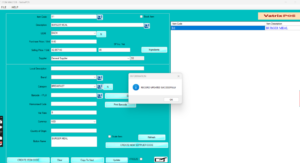
- Open Master → Item Master and click CREATE
ITEM CODE. - Enter the combo’s Item Code,
Description, Category and
Selling Price / Unit. Leave Stock Item
unticked, because stock is held by the components. Give it a
Button Name if you use button billing. - Click Update to save the combo item.
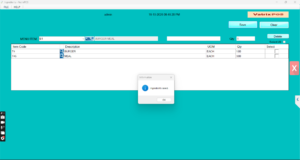
- With the combo selected, click Ingredients. The
Ingredients screen opens with the combo shown as MENU ITEM. - For each component, enter its Item Code (or scan
the Barcode), the Qty included in one
combo and the UOM. Press Enter to add the line. - Click Save.
- Sell it: open Transaction → POS Invoice, add the
combo item, take payment as normal.
Check it worked
After the sale, open Reports → Stock Report. Each
component’s quantity should have dropped by the Qty set in the recipe,
and the combo shows no stock of its own.
Common problems
- Component stock does not change → Assembly Control or Ingredients
Control is off, or the combo was saved as a Stock Item. Fix the setting
and re-save the item. - Combo shows negative stock warning → the combo itself is marked as
Stock Item. Untick it. - Component missing on the receipt → only the combo line prints. This
is normal; the Ingredients Report shows the parts.
Video
FAQ
Can I give a combo a different price on a price
list? Yes. Add the combo item to a Price List like any other
item.
Can the customer swap one component? Not within the
combo. Sell the alternative as a separate line, or create a second
combo.
Does the profit report understand combos? The
Ingredient Profit Report compares the combo’s sale value with the cost
of its components.
Need help?
WhatsApp +971 50 428 2953 · sales@vatrixerp.com · 9:30 am–9:30
pm.