

A Stock Adjustment changes item quantities without a sale or
purchase. Use the remove type for damage, expiry, theft, samples and
count differences, so the Stock Report and stock value stay correct.
Available in ERP, Laundry, Restaurant, Retail, Retail 2nd Edition and
Weigh Scale editions.
Before you start
- Your user needs Inventory permission (and approval rights to
Approve). - Count the actual quantity on the shelf and note the reason for each
item. - If you use multiple locations, know which location holds the
stock.
Steps
- Open Inventory → Stock Adjustment. The Stock
Adjustment screen opens with a new DOC No and today’s Date. - Set Adjust Type to the remove (stock out) option.
- Check the Location shows the store where the stock
is. - Enter the Item Code or scan the barcode. The
Description and UOM fill in.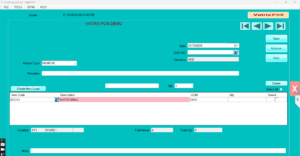
- Type the Qty to remove (a positive number; the
Adjust Type handles the direction). - Press Enter to add the line. Repeat for every item.
- Write the reason in Remarks, for example “expired
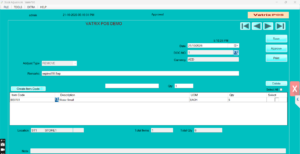
18 Sep – 6 packs”. - Click Save. Vatrix confirms the document
number. - Click Approve. Stock is reduced immediately.
 ]
] - Click PRINT PRIVIEW or Print if
you keep a paper record for the accountant.
Check it worked
Open Reports → Stock Report and find the item: the
quantity is lower by the amount removed. Reports → Stock
Adjustment Report lists the document under Stock Removed.
Common problems
- Approve is greyed → the document is not saved yet, or your user
lacks approval rights. - Stock did not change → the wrong Adjust Type was used (it added
instead). Make a second adjustment to reverse it. - Item not accepted → it is a non-stock or frozen item. Check Stock
Item in Item Master.
Video
FAQ
Can I adjust the value as well as the quantity? Use
Stock Adjustments Value for a cost correction; this article is for
quantity.
Can I edit an approved adjustment? No. Post another
adjustment to correct it. Saved but unapproved documents can be opened
from SAVED DOC.
Does the write-off appear in accounts? Yes, the
adjustment posts to the stock adjustment account and shows in the Income
Statement.
Need help?
WhatsApp +971 50 428 2953 · sales@vatrixerp.com · 9:30 am–9:30
pm.