

User roles decide which menus a login can open: a cashier gets Sales
only, a storekeeper gets Inventory and Procurement, an accountant gets
Finance. Set them so staff cannot edit documents, see cost prices or
open reports they should not. Available in all editions; the Elite plan
allows 3 users and Professional 5.
Before you start
- Log in as admin (only an Admin user can open User Management).
- Change the default admin password first (see the related
article). - List the staff, their designation and which screens each needs.
Steps
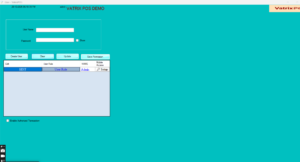
- Open Admin → User Management. The User screen opens
with the existing users. - Click Create User. The form clears.
- Type the User Name (the login name), a
Password and the Designation. - Choose the User Role: Admin for
full access, or a standard role for staff. - Tick the permission groups the user needs: Sales,
Inventory, Procurement,
Finance Vochers, Finance Reports,
Reports, Shift,
Appointment. - Tick the individual documents the user may open: Sales
Invoice, Purchase Order, GRN,
Performa Document, RV,
PV, JV, CN,
DN, CV. - Set the sensitive rights carefully: Edit Document
(change saved documents), Show Cost Price (see purchase
cost), Enable Authorized Transaction (approve
documents), Enable Mobile access.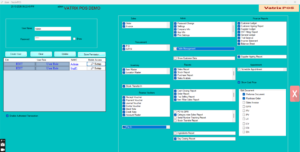
- Click Save Permission, then Update
to store the user. - To change an existing user, select them in the list, click
EDIT, adjust the ticks and click Save
Permission and Update again. - If you use several locations, open Master → Multi Location
Management and set the user’s default location.
Check it worked
Log out and log in as the new user. Menus that were not ticked should
be greyed or missing. Try opening Reports → Sales
Report: it should open only if Reports was ticked.
Common problems
- User cannot log in → the password was typed with Caps Lock, or the
user was not saved. Reset it in User Management. - Cashier can see cost price on invoices → untick Show Cost Price and
also Show Cost Price in Inv in Admin → Settings. - “Maximum users reached” → your plan’s user limit is used up. Freeze
an old user or upgrade to Professional.
Video
FAQ
Can a user have two roles? Tick any combination of
permission groups; the role name is just a label.
Can I stop a cashier deleting an invoice? Yes. Leave
Edit Document unticked. Deleting also asks for a password.
Can I see which user made each sale? The Sales
Report has an All User filter, and Shift History shows each user’s
shift.
Need help?
WhatsApp +971 50 428 2953 · sales@vatrixerp.com · 9:30 am–9:30
pm.