

The Item Wise Sales Report lists every item sold in a period with its
quantity, price and total, grouped by category. Use it to plan
purchases, count what went out on a shift, and compare items across
branches. Available in ERP, Restaurant, Retail, Retail 2nd Edition and
Weigh Scale editions.
Before you start
- Your user needs the Reports permission.
- If you use shifts, close the shift first so the shift filter is
complete.
Steps
- Open Reports → Item Wise Sales Report. The report
screen opens.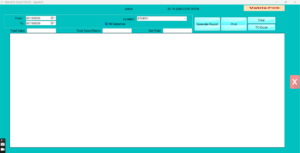
- Set From and To dates.
- Keep All Item, or choose one item to follow a
single product. - Keep All Salesman or select one.
- Keep All Shift or pick a shift number to see one
cashier session. - Select the Location or keep all.
- Click Generate Report. The grid shows CATEGORY,
ITEMCODE, DESCRIPTION, QTY, PRICE and TOTAL per item, with Total Sales
and Total Sales Return at the bottom.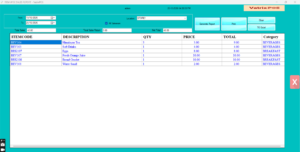
- Click TO Excel to save or Print
for paper, then Clear to run again.
Check it worked
Add the Net Total of the report for one day; it should equal Total
Sales in Reports → Sales Report for the same day.
Common problems
- Quantities look doubled → the same item was sold under two codes or
barcodes. Merge them by freezing one code. - Shift list empty → Shift Settings are not enabled in Admin →
Settings. - Category shows blank → items have no Category in Item Master. Update
them for a clearer report.
Video
FAQ
Can I see only one category? Use Reports →
Category Wise Sales Report for category totals, or filter the
Excel export.
Does it show cost or profit? No. Use the Item Wise
Profit Report.
Can I run it for last year? Yes, any date range
within the days documents are kept (set in Admin →
Settings).
Need help?
WhatsApp +971 50 428 2953 · sales@vatrixerp.com · 9:30 am–9:30
pm.