

A Receipt Voucher (RV) records money received from a customer. When a
customer pays an advance on a quotation or proforma invoice, you post
the RV against that Proforma Document so the deposit shows in the
customer ledger and is deducted when the final invoice is made.
Available in ERP, Restaurant, Retail, Retail 2nd Edition and Weigh Scale
editions.
Before you start
- The proforma or quotation must already be saved and approved in
Transaction → Proforma Document. - The customer must have a customer code (not a cash customer).
- Your user needs Finance Vochers permission (RV).
Steps
- Open Transaction → Proforma Document and click
SAVED DOC. Select the customer’s proforma and open it.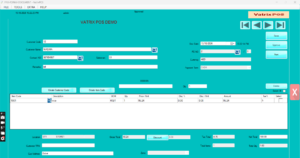
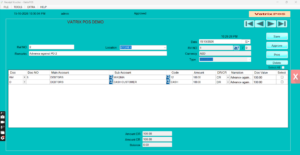
Proforma loaded with PD NO - Click Process RV. The Reciept Voucher screen opens
with the customer and document reference filled. If you prefer, open
Finance → Receipt Voucher directly and continue from
step 3. - Check Date (change it for a back-dated receipt if
allowed). - In MAIN A/C choose the cash or bank account that
received the money. Use SearchMain if needed. - In SUB A/C the customer code is filled. Use
SearchSub to change it. - In DOC REF confirm the proforma number (PD NO).
Ref.Doc. Value shows the proforma total. - Type the amount received in Amount CR against the
customer line. Balance shows what remains on the
document. - Type a Narration, for example “Advance against PD
00123”. - Click Save, then Post. Vatrix shows the RV NO.
- Click Print if the customer needs a receipt.
Check it worked
Open Reports → Customer Ledger, select the customer
and generate the report. The RV appears as a credit. Reports →
Performa Doc vs Invoice Report lists the proforma with the
amount received.
Common problems
- Process RV button is greyed → the proforma is not approved yet.
Approve it first. - Customer not found in SUB A/C → the sale was made to the default
cash customer. Edit the proforma and set the real customer code. - Amount larger than the document → Vatrix warns. Post the extra as a
separate RV without DOC REF.
Video
FAQ
Is the advance deducted automatically on the final
invoice? When you convert the proforma to a Sales Invoice, the
received amount is shown against it and the balance is what the customer
still owes.
Can I receive by card or bank transfer? Yes. Pick
the bank account in MAIN A/C.
Can I cancel a posted RV? Open it from
Finance → Voucher, select it and use Delete, if your
role allows Edit Document.
Need help?
WhatsApp +971 50 428 2953 · sales@vatrixerp.com · 9:30 am–9:30
pm.