

One-line answer: Restoring loads a backup file into
Vatrix and replaces the current database with it, bringing back all
items, customers, invoices and stock as of the backup time. Use it after
a new PC install, a Windows reinstall or to undo a data problem. Same
steps in every edition.
Before you start
- Log in as admin.
- Take a fresh manual backup of the current database first
(Admin → Settings → BACKUP). Restoring overwrites
everything entered after the backup you load. - Have the backup file on the PC or a connected drive.
- On a multi-counter setup, restore on the main PC that holds the SQL
Server database, and close Vatrix on the other counters.
Steps
- Open Admin → Settings. The Data
Base section shows the BACKUP,
RESTORE and SCHEDULE BACKUP buttons.
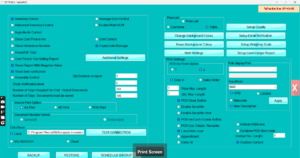
- Click RESTORE. A file window opens.
- Select the backup file you want to load and confirm. Vatrix shows a
warning that the current data will be replaced; accept it.

- Wait for the restore complete message, then close Vatrix and open it
again. - Log in. If you restored on a new or different PC, Vatrix may show
error 4201 and open the activation window. Send the
Product ID shown to Vatrix support on WhatsApp and enter the activation
code you receive. Your data is not lost.

- Open Admin → Print Settings and check the receipt
printer, then re-set the barcode printer, scale and SCHEDULE
BACKUP path if this is a new PC.
Check it worked
Open Reports → Sales Report for the last day before
the backup. The invoices are there, and Master → Item
Master lists all your items.
Common problems
- Error 4201 after restore → the database was made on
another PC. Send the Product ID to support for an activation code; see
How to fix error 4201 in Vatrix POS & ERP. - Restore fails or file not accepted → the file is
not a Vatrix backup or was cut during copying. Use another copy from the
scheduled backup folder. - Data after the backup date is missing → this is
expected. Re-enter those invoices, or restore a newer backup file.
Video
FAQ
Can I restore on a different computer? Yes. Install
Vatrix, restore the file, then activate with the code from support when
error 4201 appears.
Does restoring change my licence? No. The licence
stays with the PC; only the data is replaced.
Can I merge two backups? No. A restore replaces the
whole database. Keep one main database and use SQL Server for multiple
counters.
Need help?
WhatsApp +971 50 428 2953 · sales@vatrixerp.com · 9:30 am–9:30 pm