

You update an item when its selling price, description, category, VAT
rate or menu button name changes. This is done in Item Master by
selecting the item and clicking Update. It works the same in the
Laundry, Restaurant, Retail 2nd Edition and Weigh Scale editions, where
invoices are made from item buttons.
Before you start
- Log in with a user that has Inventory or Admin permission.
- If the item already appears on the POS button screen, note its
Button Name so you keep the layout tidy.
Steps
- Open Master → Item Master. The ITEM MASTER screen
opens with the item list on the right. - Click the item in the list, or type part of its name in the search
box and press Enter. Its details fill the form on the left.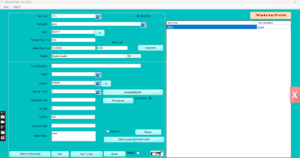
Item Master with an item selected - Change what you need:
- Selling Price / Unit or SP
Inc. Vat for a price change (enter one; the other
recalculates). - Description or Local Description
for the name printed on the invoice. - Category, Sub Category,
Brand, Vat Rate, Purchase
Price / Unit as required. - Button Name for the short label shown on the POS
button.
- Selling Price / Unit or SP
- Click Update. Vatrix confirms the item is saved.
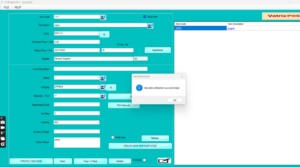
Update button and confirmation - Click Clear and repeat for the next item.
- To change the same field on many items, click CREATE BULK
ITEMS and use the Bulk Items Edit grid, then
Update.
Check it worked
Open Transaction → POS Invoice and add the item. The
new price and description appear on the line.
Common problems
- Price does not change on the POS → the item is linked to a Price
List that overrides the master price. Update the price in Master
→ Price List as well. - Update button is disabled → you selected nothing, or the item is
frozen. Select the item again. - Old price still prints → an invoice was on HOLD before the change.
Recall it and re-add the item.
Video
FAQ
Can I change the Item Code? No. Freeze the old item
and create a new one.
Does changing the price affect old invoices?
No. Saved invoices keep the price at the time of sale.
Can I change prices for a whole category at once?
Yes, through Bulk Items Edit or the Excel bulk price update; see the
related article.
Need help?
WhatsApp +971 50 428 2953 · sales@vatrixerp.com · 9:30 am–9:30
pm.