

One-line answer: Your address and phone numbers are
stored in Company Info and printed in the invoice header when the
address option is on in Print Settings. A UAE tax invoice must show the
supplier’s name and address, so set this up before you start billing in
any edition: Restaurant, Retail, Retail 2nd Edition, Salon, Laundry or
Weigh Scale.
Before you start
- Log in as admin or a user with
Admin access. - Have the exact address from your trade licence and the numbers
customers should call. - Connect the receipt printer for a test print.
Steps
- Open Admin → Company Info. The Company Information
screen opens. - Type the shop address in OFFICE ADDRESS. Keep it to
two or three short lines so it fits the 80 mm receipt.
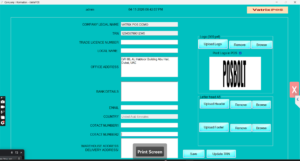
- Enter the phone numbers in COTACT NUMBER1 and
COTACT NUMBER2, for example the landline and the
WhatsApp number. - Fill in EMAIL if you want it on the invoice
too. - Click Save.
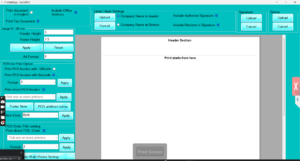
- Open Admin → Print Settings. Under the POS invoice
options, tick Include Office Address and click
Apply.
- Open Transaction → POS Invoice, complete a test
sale and print it.
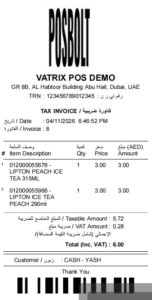
Check it worked
The receipt header shows the company name, address and contact
numbers below the logo.
Common problems
- Address not printing → Include Office
Address is not ticked in Admin → Print
Settings. Tick it and click Apply. - Address cut at the side → lines are too long for
the thermal paper. Shorten each line in Company Info. - Old address still prints → Vatrix was open when you
saved. Close and reopen the program.
Video
FAQ
Can I print a different address for the warehouse?
Yes. Fill WAREHOUSE ADDRESS / DELIVERY ADDRESS in
Company Info; it is used on purchase documents.
Where does the TRN go? Enter it in TR
NUMBER on the same Company Info screen; see How to update
trn in Invoice in Vatrix POS & ERP.
Can I add a footer message such as “Thank you, visit
again”? Yes. Use Footer Note in Admin
→ Print Settings.
Need help?
WhatsApp +971 50 428 2953 · sales@vatrixerp.com · 9:30 am–9:30 pm