

One-line answer: The Cash Ledger Report shows the
cash movement for one date – cash sales, receipts, pay-ins and pay-outs
– so you can match the drawer at the end of the day. It is available in
every edition: Restaurant, Retail, Retail 2nd Edition, Salon, Laundry,
Weigh Scale and ERP.
Before you start
- Your user role must have access to Reports (see
How to Manage User Roles in Vatrix POS & ERP). - Decide which documents should count as cash. This is set once in
Admin → Settings → Setup Cash Ledger Report (options
such as POS, Cash Invoice List, Credit Invoice List, Credit Customer, RV
button in INV, RV button in PI, PV button in GRN). - Complete or settle all invoices for the day before you print.
Steps
- Log in and open Reports → Cash Ledger Report. The
Cash Ledger Report screen opens with a Date field,
Generate Report, Print,
Settings and Clear buttons. - Pick the date you want in Date. Today’s date is
selected by default. - Click Generate Report. The screen fills with the
cash entries for that date and a closing figure at the bottom.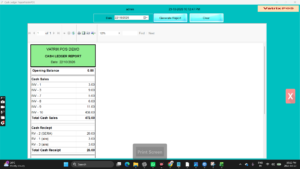
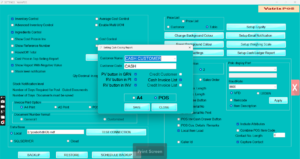
- To include or exclude document types (for example, receipt vouchers
against sales invoices), click Settings. The Setting
Cash Closing Report window opens. Tick the options you need, then click
SAVE and generate the report again.
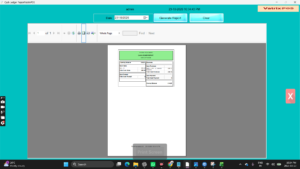
- Click Print to send the report to your default
printer. Use A4 in the settings window if you want the
A4 layout instead of the thermal receipt.
- Click Clear to reset the date and run the report
for another day.
Check it worked
Count the cash in the drawer. The closing figure on the report should
equal the drawer cash plus the opening float. If it does, the day is
balanced.
Common problems
- Report is empty → no cash documents exist for that
date, or the shift is still open. Check the date and generate
again. - Cash figure is lower than the drawer → receipt
vouchers or pay-ins are not ticked in Settings. Tick
RV button in INV / RV button in PI and
save. - Print button does nothing → the default Windows
printer is offline. Set the correct printer in Admin → Print
Settings and try again.
Video
FAQ
Is this the same as the Day Closing Report? No. The
Day Closing Report summarises all sales by payment mode. The Cash Ledger
Report lists only cash movements for the date.
Can I see more than one day at a time? No. The
report is built for a single date. Run it once per day, or use the Sales
Report for a date range.
Can I export it to Excel? This report is print-only.
Use the Settlement Report or Sales Report if you need an Excel file.
Need help?
WhatsApp +971 50 428 2953 · sales@vatrixerp.com · 9:30 am–9:30 pm