

One-line answer: Scheduled backup saves a copy of
your Vatrix database automatically at a fixed time each day or week, so
a hard-disk failure or a virus does not cost you your sales and stock
history. Set it up once on every edition: Restaurant, Retail, Retail 2nd
Edition, Salon, Laundry, Weigh Scale and ERP.
Before you start
- Log in as admin or a user with Admin →
Settings access. - Create a backup folder that is not on the same drive as Windows if
you can, for example a second disk, a USB drive that stays connected, or
a Google Drive desktop folder. - Vatrix must be open and the PC switched on at the scheduled
time.
Steps
- Open Admin → Settings and click SCHEDULE
BACKUP. The Schedule backup screen opens and shows the
Database Name.
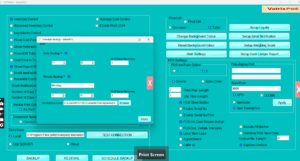
- Tick Daily Backup ? for a backup every day, or
Weekly Backup ? and pick the Day for
once a week. Daily is recommended for shops. - Set the Hour and Minutes. Choose a
time when Vatrix is open but the counter is quiet, for example 15
minutes after opening. - Click Browse next to Backup
Location and select your backup folder.
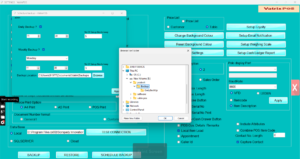
- Tick Backup to this PC when the backup should be
taken from this computer (on a multi-counter SQL Server setup, tick it
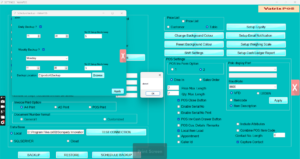
on the main PC only). - Enter No Of Bakup files to keep, for example 7.
Older files are removed automatically so the folder does not fill
up. - Click Apply.
Check it worked
After the scheduled time passes, open the backup folder in Windows. A
new backup file with today’s date should be there (a typical file is
around 1 GB).
Common problems
- No file appears → Vatrix was closed or the PC was
off at the set time. Keep Vatrix running, or change the hour. - Folder fills the disk → No Of Bakup files
to keep is blank. Set a number such as 7. - Backup on a USB drive stops → the drive letter
changed. Browse to the folder again and click
Apply.
Video
FAQ
Can the backup go to Google Drive? Yes. Point
Backup Location to a folder inside your Google Drive
desktop folder; see How to sync Vatrix backup folder to Google
Drive.
Does the scheduled backup slow down billing? It runs
in the background for a short time. Choose a quiet hour and cashiers
will not notice.
Should I still take manual backups? Yes, before any
update, restore or PC change. See How to make backup in Vatrix POS
and ERP.
Need help?
WhatsApp +971 50 428 2953 · sales@vatrixerp.com · 9:30 am–9:30 pm