

One-line answer: Your Tax Registration Number (TRN)
must print on every tax invoice in the UAE. In Vatrix you store the TRN
once in Company Info and it appears on POS, A4 and A5 invoices in all
editions (Restaurant, Retail, Retail 2nd Edition, Salon, Laundry, Weigh
Scale and ERP).
Before you start
- Have your 15-digit TRN from the FTA certificate.
- Log in as admin.
- The TRN is locked after first entry. Changing it needs a product key
from Vatrix support, so keep WhatsApp +971 50 428 2953 ready.
Steps
- Open Admin → Company Info. The Company Information
screen shows COMPANY LEGAL NAME, OFFICE
ADDRESS, TR NUMBER and TRADE LICENCE
NUMBER.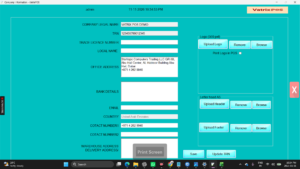
- If TR NUMBER is empty, type the TRN and click
Save. Skip to step 7. - If a TRN is already saved, click Update TRN. The
Udate TRN screen opens with Product key, Tax
Rate and UPDATE TRN.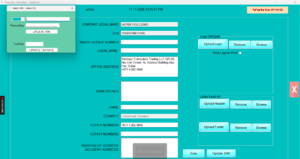
- Send your Company Id and the new TRN to Vatrix support on WhatsApp.
Support sends a Product key. - Enter the Product key and the new TRN, then click
UPDATE TRN. - Leave Tax Rate at 5 unless support tells you
otherwise. UPDATE TAX RATE is only for a rate
change. - Open Admin → Print Settings, tick Print Tax
Document and click Apply so the invoice
heading reads Tax Invoice.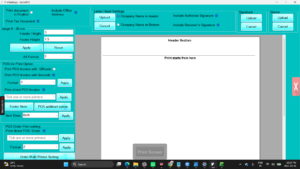
- Restart Vatrix.
Check it worked
Make a test POS invoice and click print preview. The header shows the
company name, address and TRN. The customer’s TRN prints when it is
entered in Customer Master.
Common problems
- TRN prints but customer TRN is missing → Enter the
TRN in Master → Customer Master and tick Print
Customer TAX No in POS Invoice in POS INV Settings. - Old TRN still shows → Restart Vatrix; the header
loads at start-up. - Update TRN asks for a key → This is expected.
Contact support for the key; it protects your VAT records from
accidental changes.
Video
FAQ
Do I need a TRN if I am not VAT registered?
No. Leave the field blank and untick Print Tax Document. Invoices print
as ordinary invoices with no VAT line.
Does changing the TRN change old invoices? Reprinted
old invoices show the current TRN. Keep PDF copies of invoices issued
under the old number.
Where does the TRN appear on A4 invoices? In the
letterhead area with your address, as required for a UAE tax
invoice.
Need help?
WhatsApp +971 50 428 2953 · sales@vatrixerp.com · 9:30 am–9:30 pm