

One-line answer: A main account is a ledger head
such as Rent Expense, Bank Account or Sales Income. You create one when
you need to post a voucher to a head that does not exist yet. Available
in all editions (Restaurant, Retail, Retail 2nd Edition, Salon, Laundry,
Weigh Scale and ERP); ERP users use it most for Payment Voucher, Journal
Voucher and financial reports.
Before you start
- Log in as admin or a user with Finance Vochers
permission. - Decide the Account Type: Asset, Equity and
Liability, Income or Expense. This cannot be changed easily after
vouchers are posted. - Check the account does not already exist to avoid a duplicate head
in the Trial Balance.
Steps
- Open Master → Account Master. The Main Account
screen opens with the list of existing accounts.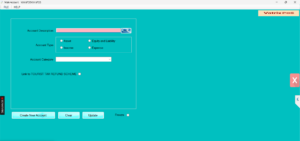
- Click Create New Account. The form clears.
- Enter the Account Number (leave blank if Vatrix
auto-numbers) and Account Description, for example
Shop Rent. - Type a Short Description for reports.
- Choose the Account Type: Asset,
Equity and Liability, Income or
Expense. - Choose the Account Category (for example Current
Asset or Direct Expense) so the account lands in the right section of
the Balance Sheet or Income Statement.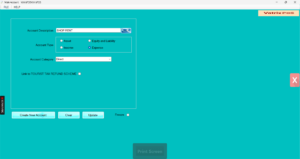
- Click Update to save. The new account appears in
the list.
Check it worked
Open Finance → Payment Voucher and click the account
search. The new account should appear in Search
Account. 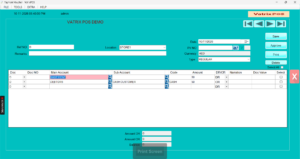
Common problems
- Account not found in voucher → Refresh the voucher
screen or reopen it; the list loads when the form opens. - Wrong section in Balance Sheet → The Account
Category is wrong. Load the account, change the category, click
Update. - Need to remove an account → Use
Freeze on the Account Master screen. Accounts with
entries cannot be deleted.
Video
FAQ
Are customers and suppliers main accounts? No. They
are sub-ledgers created in Customer Master and Supplier Master and
linked to the receivable and payable heads automatically.
Can I create a bank account here? Yes. Create it as
an Asset with a bank category, then use it in Receipt and Payment
Vouchers.
What is Link to TOURIST TAX REFUND SCHEME? It is an
option for retailers registered under the FTA tourist refund scheme.
Leave it unticked unless you are registered.
Need help?
WhatsApp +971 50 428 2953 · sales@vatrixerp.com · 9:30 am–9:30 pm