

One-line answer: A purchase return without GRN lets
you send goods back to a supplier when the original receipt was not
recorded in Vatrix, for example opening stock or goods received before
you started using the software. It reduces stock and debits the
supplier’s account. Available in Retail, Retail 2nd Edition, Weigh
Scale, Restaurant and ERP.
Before you start
- The supplier must exist in Master → Supplier
Master. - The items must exist in Master → Item Master and
have stock at the location you are returning from. - If a GRN does exist for the goods, use How to Prepare a Purchase
Return with GRN in Vatrix POS instead so the return links to
it.
Steps
- Open Procurement → Purchase Return. The PURCHASE
RETURN screen opens with a new PRTN NO, today’s
Date and your Location. - Type or select the Supplier Code. The
Supplier Name and Supplier TRN fill
in.
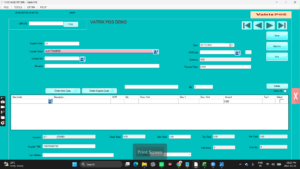
- Leave GRN NO empty and do not click
PULL. You are entering the lines manually. - In Ref No, type the supplier’s credit note or
return reference if you have one. - In the grid, scan or type the Item Code, enter the
Qty being returned and the Price /Unit
you paid. Apply any Disc /Unit used on the original
purchase so the value matches. Tax% and
Amount calculate automatically.
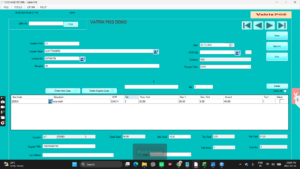
- Add a short Remarks note, for example “damaged on
arrival”. - Click Save, then Approve. Stock is
reduced and the supplier ledger is debited by the Net
Total.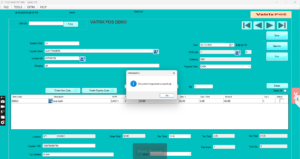
- Click Print and send the copy with the goods to the
supplier.
Check it worked
Open Reports → Stock Report and confirm the item
quantity has gone down. In Reports → Supplier Ledger,
the return appears as a debit against the supplier.
Common problems
- Qty rejected → the item has less stock than the
return quantity at that location. Check Reports → Stock
Report and correct the quantity or location. - Supplier balance did not change → the document was
saved but not approved. Open SAVED DOC, select it and
click Approve. - VAT differs from the supplier’s credit note → match
the Tax% and discount per line to the original
purchase.
Video
FAQ
Which should I use, with GRN or without GRN? With
GRN whenever the goods came in on a Vatrix GRN. Without GRN only when
there is no GRN to pull from.
Can I return serial-numbered items this way? Yes.
When serial capture is enabled, select the Serial
Number of the unit being returned on the line.
How do I record the refund from the supplier? Raise
a Receipt Voucher or adjust the next Payment Voucher against the
supplier balance under Finance.
Need help?
WhatsApp +971 50 428 2953 · sales@vatrixerp.com · 9:30 am–9:30 pm