

Weigh scale management lets Vatrix POS read the barcode printed by a
weighing scale (Brecknell, Magellan and similar) and add the item,
weight and price to the invoice in one scan. You need it in grocery,
fruit and vegetable, butchery and fish shops that sell by weight. It is
available in the Retail, Retail 2nd Edition and Weigh Scale
editions.
Before you start
- Log in as admin or a user with Admin rights.
- Know the barcode format your scale prints (prefix, PLU length, and
whether the number after the PLU is weight or price). Print one sample
label from the scale. - Create the weighed items in Item Master first, with a short PLU
number as the barcode.
Steps
- Open Admin → Settings. The Settings screen opens
with the General1 tab. - Click Setup Weighing Scale. The Scale Setting
window opens. - Tick ENABLE SCALE BARCODE.
- In SART (start), type the prefix digit(s) your
scale prints at the beginning of every label, for example 2. - Under ITEM CODE, set LENGTH to the
number of digits used for the PLU on the label (usually 4 or 5). - Choose what the scale encodes after the PLU: tick QTY
FLAG if the label carries weight, or PRICE
FLAG if it carries the total price. Set LENGTH
and DECIMAL for that block (for example 5 digits with 3
decimals for 1.250 kg). - If the label price includes VAT, tick Price Inc
VAT. Tick Include Price if you want the label
price to override the item price.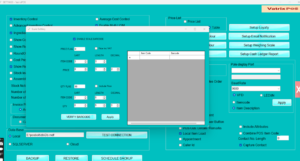
- Paste a sample label barcode in the Barcode box and
click VERIFY BARCODE. The screen shows the item code,
quantity and price it reads from that barcode. - Click Apply and then Apply again
on the Settings screen. - Open Master → Item Master, select each weighed
item, tick Scale Item, enter the PLU in Barcode
/ PLU and click Update.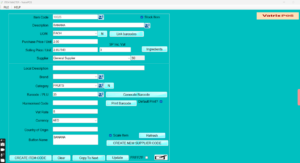
Check it worked
Open Transaction → POS Invoice and scan a label from
the scale. The item line should show the weight in Qty and the correct
amount.
Common problems
- Scan gives “item not found” → the PLU length or start digit does not
match the label. Re-check with VERIFY BARCODE. - Weight shows 1250 instead of 1.250 → DECIMAL is set to 0. Change it
to 3. - Price is 5% out → the label already includes VAT. Tick Price Inc
VAT.
Video
FAQ
Which scales work with Vatrix POS? Any scale that
prints a standard EAN-13 style label with a fixed prefix, PLU and weight
or price block. Brecknell and Magellan models are sold by Vatrix.
Do I need a separate barcode for each weight?
No. One PLU per item; the scale writes the weight into the barcode.
Can the same PC also scan normal packaged items?
Yes. Barcodes that do not start with the scale prefix are treated as
normal items.
Need help?
WhatsApp +971 50 428 2953 · sales@vatrixerp.com · 9:30 am–9:30
pm.